Introduction
Introduction
Chat with AI▼
- Customer selects a product/service at the store and chooses POS payment.
- The POS terminal creates the transaction and directs the customer to pay by card or scan a QR code.
- The transaction result is processed and notified to the customer/merchant.
Payment Flow
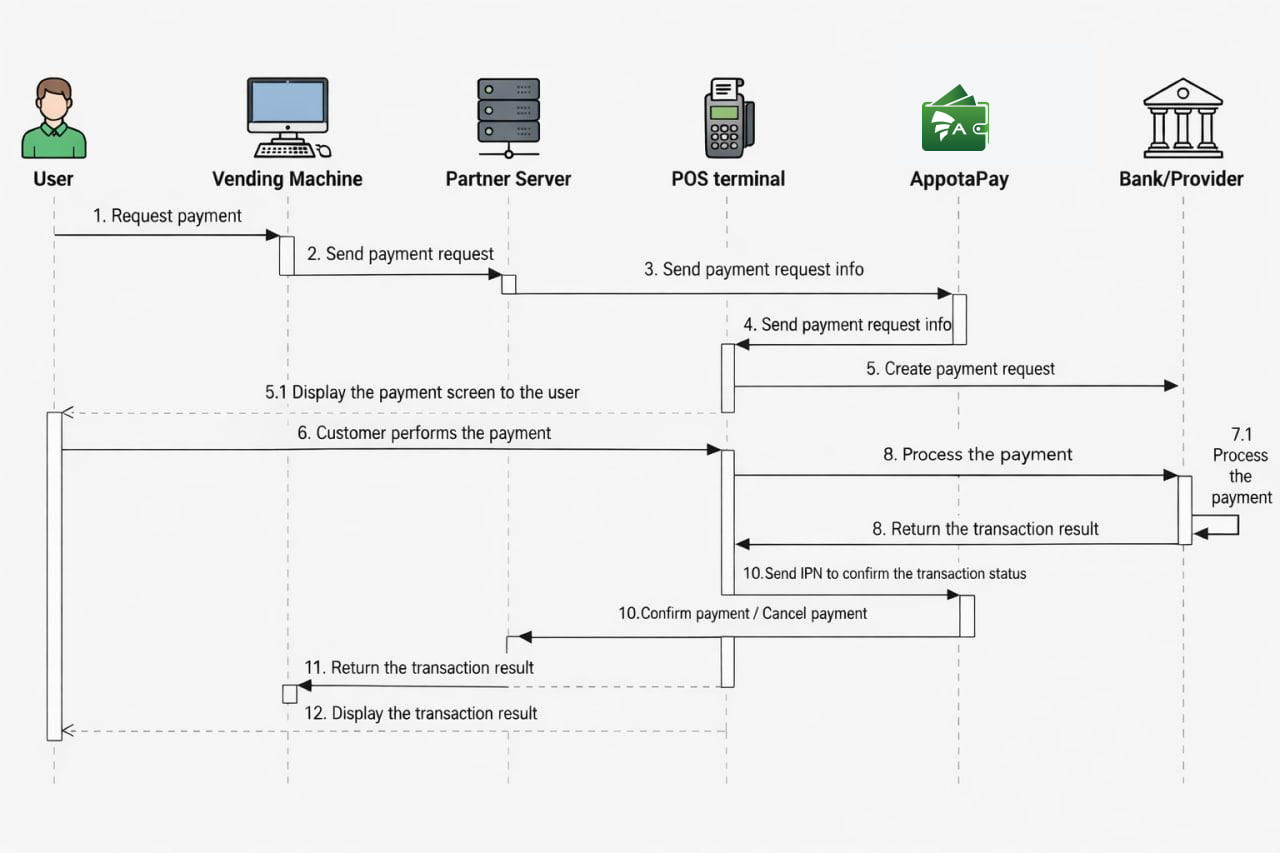
Flow explanation
- Step 1: The customer selects a product and requests payment.
- Step 2: The vending machine sends a payment request to the Partner Server.
- Step 3: The Partner Server forwards the payment request to AppotaPay.
- Step 4: AppotaPay creates a payment request and sends it to the POS terminal.
- Step 5: The POS terminal generates a payment request via ATM/Credit Card or QR code to the Bank/Provider and displays the payment screen for the customer.
- Step 6: The customer performs the payment.
- Step 7: The POS terminal and the Bank/Provider process the customer’s payment.
- Step 8: The Bank/Provider returns the payment transaction result.
- Step 9: The POS terminal sends a payment confirmation or cancellation to AppotaPay.
- Step 10: AppotaPay sends an IPN to confirm the transaction status to the Partner Server.
- Step 11: The Partner Server returns the transaction result to the vending machine.
- Step 12: The POS terminal processes and displays the transaction result to the customer.
Transaction settlement flow
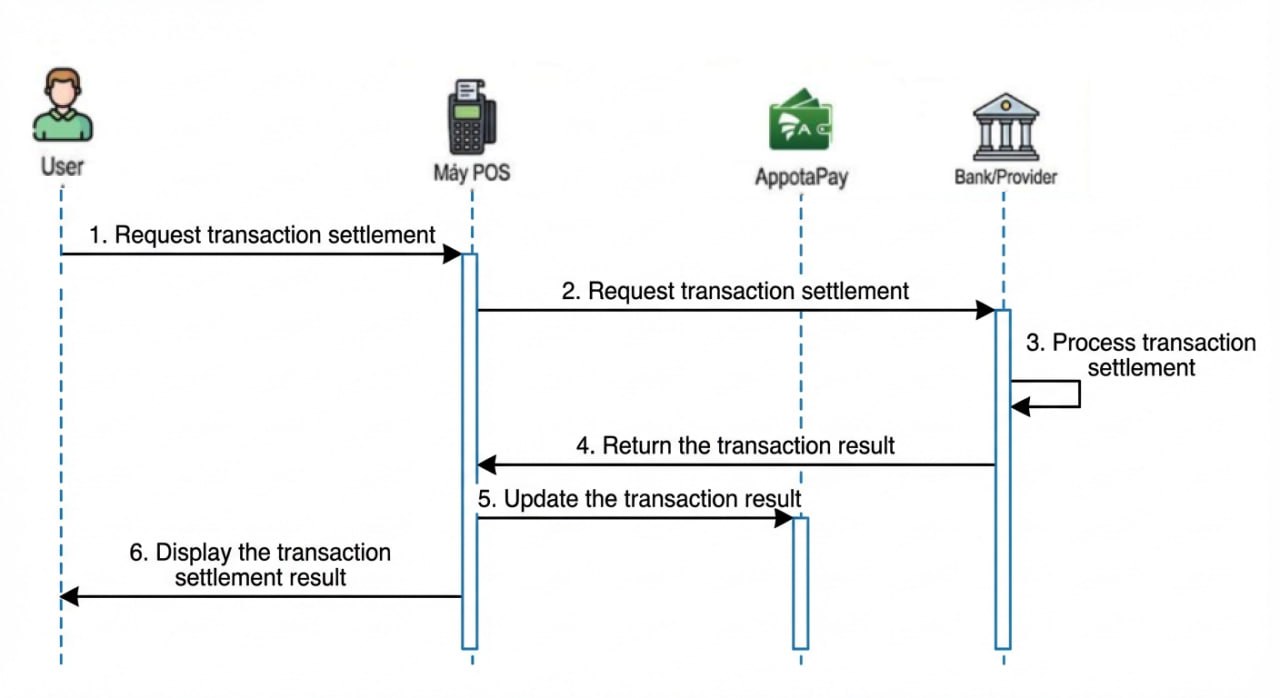
Flow explanation
- Step 1: The cashier/customer requests transaction settlement.
- Step 2: The POS terminal sends the settlement request to the Bank/Provider.
- Step 3: The Bank/Provider processes the transaction settlement.
- Step 4: The Bank/Provider returns the settlement result.
- Step 5: The POS terminal updates the settlement result to AppotaPay.
- Step 6: The POS terminal displays the settlement result to the cashier/customer.
Payment void flow
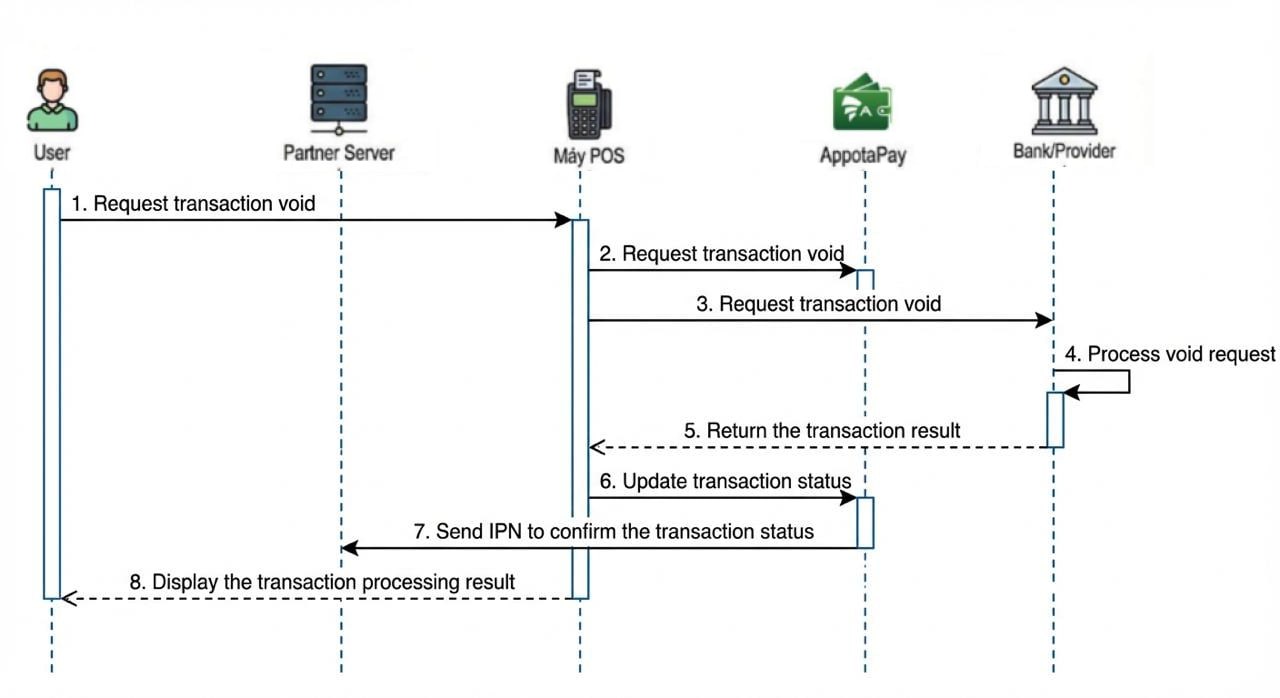
Flow explanation
- Step 1: The cashier/customer requests to void the transaction.
- Step 2: The POS terminal sends a transaction void request to AppotaPay.
- Step 3: The POS terminal sends the transaction void request to the Bank/Provider.
- Step 4: The Bank/Provider processes the transaction void request.
- Step 5: The Bank/Provider returns the transaction void result.
- Step 6: The POS terminal sends a request to update the transaction status to AppotaPay.
- Step 7: AppotaPay sends an IPN to confirm the transaction status to the Partner Server.
- Step 8: The POS terminal processes and displays the void transaction result to the cashier/customer
Integration information
Integration environment
- Dev: Used for testing and debugging during integration.
- Production: Live environment after successful integration.
Connection information
-
PARTNER CODE: The partner code provided by AppotaPay after account registration is completed Register account.
-
API KEY: Used to connect to the API, provided by AppotaPay.
-
SECRET KEY: Used to generate and verify the digital signature.
-
Terminal ID: The unique identifier of the device.
| Environment | Domain | Incoming IP | OutComing IP |
|---|---|---|---|
| Dev | https://pos-gw.dev.appotapay.com | 58.187.8.221 | 58.187.8.222 |
| Production | https://pos-gw.appotapay.com | 54.151.252.252, 52.76.192.70, 43.239.223.231 |
Dev connection information
Dev account
| PartnerCode | TESTPOS |
|---|---|
| ApiKey | Iux2JV4x1Sh0Z3s3La1XTU75N3vPDhuY |
| SecretKey | uHIlkPbx1ZB7AtgSYEuiqcMWTC2DfXyL |
| TerminalID | TID-01JQ3Q9PCK0AB8 |